- Google Unternehmensprofil
- Google Business Profile
- Local SEO
- Google Bewertungen
How to Optimize Your Google Business Profile: A Checklist for Better Local Visibility
For many local businesses, the decision to call, visit or keep searching starts directly on Google. The right business information, categories, services, photos and reviews can turn your Google Business Profile into a strong first point of contact. This checklist shows what matters and what you should review regularly.
A Google Business Profile is much more than a digital business listing for a local company. When someone searches for a restaurant, dental practice, contractor or shop nearby, Google can already show the information they need: rating, opening hours, phone number, photos, directions and website.
A potential customer may therefore make a decision before ever opening your website.
That is why creating a profile once and then forgetting about it is rarely enough. Many of its most important details can be maintained directly by the business. Other areas, such as reviews, can at least be actively managed and monitored.
According to Google, local results are primarily determined by three factors: relevance, distance and prominence. Complete and accurate business information helps Google understand a business and match it with relevant searches.
If you want to optimize your Google Business Profile, there is no secret trick to look for. The goal is much simpler: Google and potential customers should quickly understand who you are, what you offer and whether your business is relevant to what they are looking for.
We explain how local rankings work in more detail in our guide to local ranking on Google.
Business information: Small mistakes are easy to notice
Opening hours that have not been updated for two years, a phone number nobody answers anymore or a map pin on the wrong building may seem minor.
For a potential customer, any one of them can be enough to choose the next business instead.
Start with the information that is easiest to verify.
Business name
Use the real name of your business, exactly as it is used outside Google.
Additions such as "Cheap Dentist Cologne", "Best Garage Bonn" or extra service keywords should not be added to the business name unless they are genuinely part of the name used in the real world.
Adding keywords purely for visibility goes against Google's Business Profile guidelines and can result in restrictions on the profile.
Address, service area and map pin
If customers visit your shop, practice, restaurant or office, make sure the address is complete and accurate.
Check the map pin as well. In business parks, shopping centres and buildings with several entrances, the technically correct address can still leave the pin in an inconvenient position.
Different rules apply to service-area businesses that visit customers and do not receive customers at their own address. In those cases, the address may need to be hidden while the actual service area is shown instead.
Opening hours
Do not only check Monday through Friday.
Public holidays, temporary closures, annual leave and unusual opening hours should also be reflected in the profile.
If Google tells someone that you are open and they arrive to find a locked door, the customer relationship has started badly before anyone has even spoken.
Google provides special hours for holidays and other temporary changes.
Phone number and website
The phone number should actually reach the relevant business location. The website link should lead to a working and appropriate page.
Every now and then, open your own profile as if you were a customer and test what happens when you tap "Call", "Website" or an appointment link.
It sounds obvious.
That is exactly why it is easy to overlook.
Business description
Your business description deserves attention too.
Its purpose is not to contain as many keywords as possible. It should help a new customer understand:
What does the business offer?
Who is the service for?
What genuinely distinguishes the business?
What should someone know before visiting or making an enquiry?
Write for people, not for an imaginary keyword density score.
Categories: Precision beats quantity
Your primary category is one of the most important pieces of information in the profile.
Google recommends choosing specific categories that describe what a business is.
A dental practice, for example, is a dental practice. The fact that it offers several treatments does not mean every treatment should become another business category.
Your primary category should describe the core business as accurately as possible.
Additional categories can make sense when several types of business genuinely apply. Adding more categories, however, does not automatically make a profile better.
One common mistake is treating categories like keywords and adding as many as possible.
That is not what they are designed for.
Keep services and products complete
Depending on the business category, services or products can be added directly to a Google Business Profile.
A plumbing company may list individual services, a clinic may show treatments and a retailer may display products.
The practical benefit is straightforward: potential customers do not have to search through an entire website just to discover whether a particular service is available.
For some searches, Google may also highlight relevant services directly in the profile.
Review them regularly:
Are important services missing?
Are services still listed that you no longer provide?
Are the names easy to understand?
Are descriptions and prices, where applicable, still accurate?
A useful services section is not a collection of search terms. It should give customers a clear answer quickly.
Attributes: Small details can matter a lot
Google offers different profile attributes depending on the type of business.
These can include information about accessibility, parking, Wi-Fi, seating, payment options or appointment availability.
Not every attribute is available to every business, and some information may come from other sources.
They are still worth checking.
For someone who needs wheelchair access or is specifically looking for a particular facility, one accurate attribute may be more useful than an entire paragraph of marketing copy.
Photos: Show the place customers will actually visit
A useful business photo does not need to look like an advertising campaign.
Often, the simplest images are the most valuable:
exterior and entrance
interior
team
products or typical work
relevant rooms or facilities
current features of the location
Someone choosing a restaurant wants to see what it looks like. A patient may want a feel for a clinic before making an appointment. A clear exterior photo can help a customer find the correct entrance.
Use recent and authentic images wherever possible.
A photograph can still be technically accurate after ten years while presenting a completely outdated impression of the business.
Posts: Make current information visible
Google Business Profile posts allow businesses to publish updates, events and offers that can appear on Google Search and Google Maps.
They are most useful when you genuinely have something worth communicating.
A restaurant might highlight a seasonal menu, a dealership could promote an event and a clinic may use a post to communicate temporary changes.
Do not publish content simply to make the profile look "active".
One useful update is more valuable to a customer than five generic posts with no real information.
Treat posts primarily as a communication tool, not as a guaranteed ranking shortcut.
Reviews are part of profile management
Reviews are highly visible on a Google Business Profile. They can also contribute to a business's prominence in local search results.
Three areas deserve particular attention.
1. Ask real customers for honest feedback
Google provides businesses with a direct review link that can also be shared using a QR code.
Ask customers for an honest review without first filtering out people who might leave criticism.
Incentives such as discounts, gifts or free services in exchange for reviews are not allowed.
Our guide on how to improve your Google Maps rating explains how to build a compliant review process.
2. Reply when your response adds value
A personal reply can show that customer feedback is taken seriously. That does not mean every positive review needs another generic "Thank you for the five stars."
Google itself points out that businesses do not need to publicly thank every reviewer.
Reply when you can add relevant information, when a customer has raised a question or when criticism deserves a factual response.
For negative reviews, keep the response calm, avoid publishing personal information and do not turn a review into a public argument.
Our guide to negative Google reviews explains how to handle different situations.
3. Report reviews that violate Google's policies
A review does not disappear simply because it is negative or unpleasant.
Google removes reviews when they violate its applicable content policies. This may include fake engagement, conflicts of interest, certain forms of harassment or other prohibited content.
When reporting a review, the useful question is therefore not whether the review feels unfair. The important question is which specific policy may have been violated.
Google makes the final decision on removal.
Found reviews you cannot associate with a genuine interaction?
With Mapnovi, you can select publicly visible reviews on your Business Profile and submit them for review. Mapnovi handles the technical and administrative submission. Google reviews the case and decides whether any action should be taken.
0 euros upfront. No subscription fee. Success-based billing in accordance with our Terms and Conditions.
Your quarterly Google Business Profile checklist
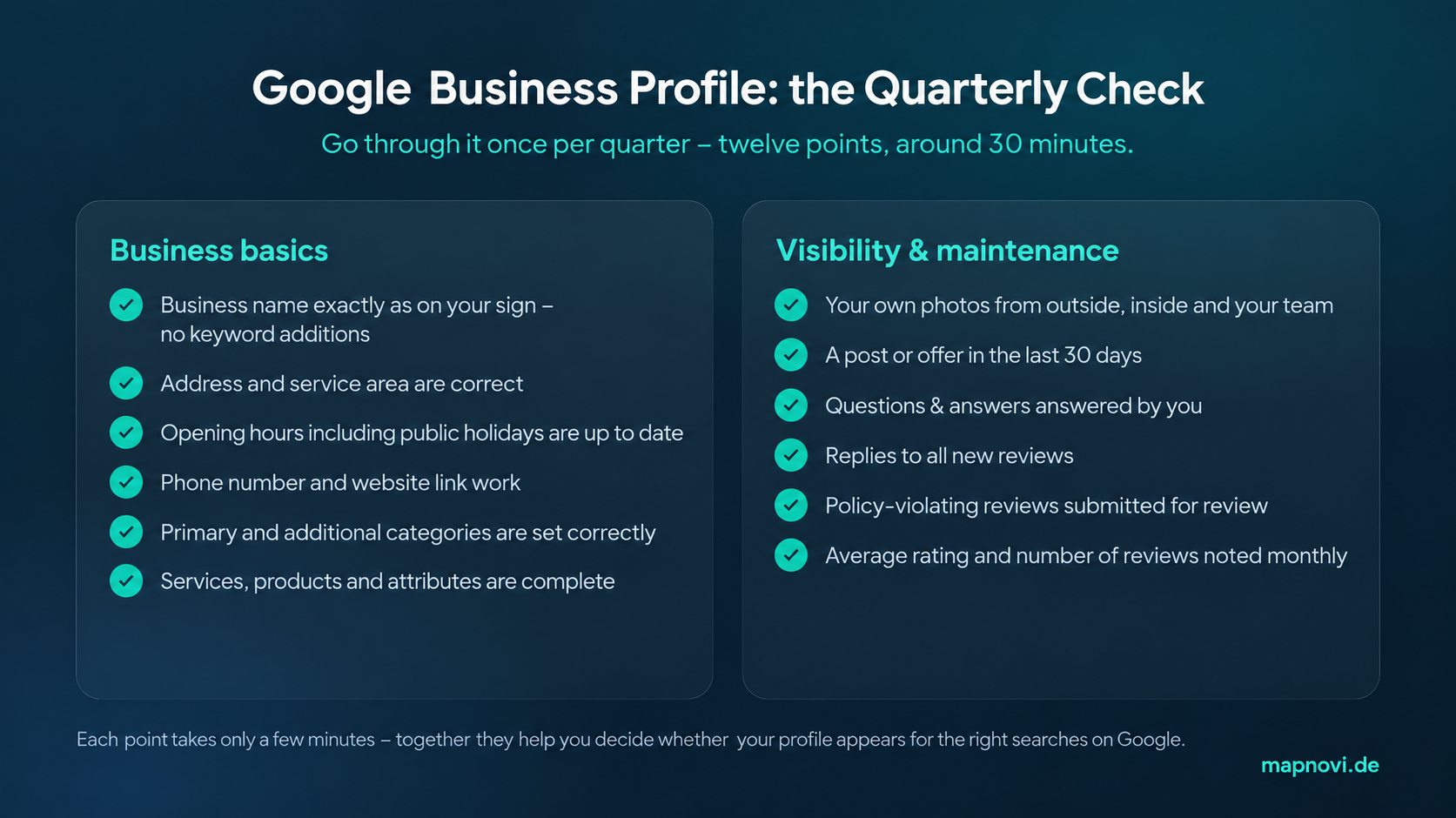
Quarterly Google Business Profile optimization checklist with twelve items to review
Once the profile is properly set up, a thorough quarterly review can often be completed in around 30 minutes.
Check these twelve points:
Does the business name match the name genuinely used by the company?
Are the address, service area and map pin correct?
Are the regular opening hours accurate?
Have public holidays, temporary closures and special hours been updated?
Do the phone number, website and appointment links work?
Does the primary category still describe the core business?
Are all additional categories genuinely relevant?
Are services or products complete and current?
Are the available attributes accurate?
Do the photos still represent the current location and offering?
Is there any current information worth publishing as a post?
Have reviews, search queries or profile interactions changed noticeably?
Reviews should not wait for the quarterly check. New reviews and potential issues are worth monitoring more regularly.
Measure what your profile actually delivers
An optimized profile should not only look better. You should also understand how people use it.
Depending on the profile, verified businesses can use Google Business Profile performance data to see metrics such as:
profile views
search terms people used to find the business
direction requests
clicks on the call button
website clicks
other available customer interactions
Do not judge performance from a single month in isolation.
Comparing a beer garden in October with July, or an accounting firm in May with January, can produce conclusions that have more to do with seasonality than profile quality.
Compare similar periods where possible and look at several metrics together.
If profile views increase significantly while interactions do not, that does not automatically prove there is a problem. It does give you a reason to review the first impression of the profile: photos, rating, opening hours, services and contact information.
That is what useful optimization is ultimately about.
Not every number has to increase.
The right information should help the right customer reach the next sensible action as quickly as possible.
What not to do
When optimizing a Google Business Profile, it is easy to assume that more is always better.
Often, it is not.
Avoid:
adding keywords to the business name when they are not part of the real name
adding irrelevant categories
listing services the business does not actually provide
leaving outdated opening hours online
buying or incentivizing reviews
selectively asking only happy customers for reviews
posting the same generic reply under every review
reporting legitimate criticism simply because it is negative
A strong Business Profile should not look artificially optimized.
It should be accurate, complete, current and useful.
Conclusion
You do not need a secret SEO trick to optimize a Google Business Profile.
The biggest improvements usually come from consistently getting the basics right: accurate business information, a precise primary category, clear services, current photos, useful information and professional review management.
Set aside time once every quarter for a full review and monitor reviews and important changes more regularly.
Ultimately, your profile should answer two questions quickly:
Is this business relevant to what I am looking for?
And do I want to call, visit or make an enquiry?
If both answers are yes, the profile is doing its most important job.
Found potentially problematic reviews while checking your profile?
If you cannot associate a review with an actual customer, business, employment or application interaction, you can submit it for review through Mapnovi.
You select the review. Mapnovi handles the technical and administrative submission. Google reviews the case and decides whether any action should be taken.
0 euros upfront. No subscription fee. Success-based billing in accordance with our Terms and Conditions.
Updated on 16 October 2026